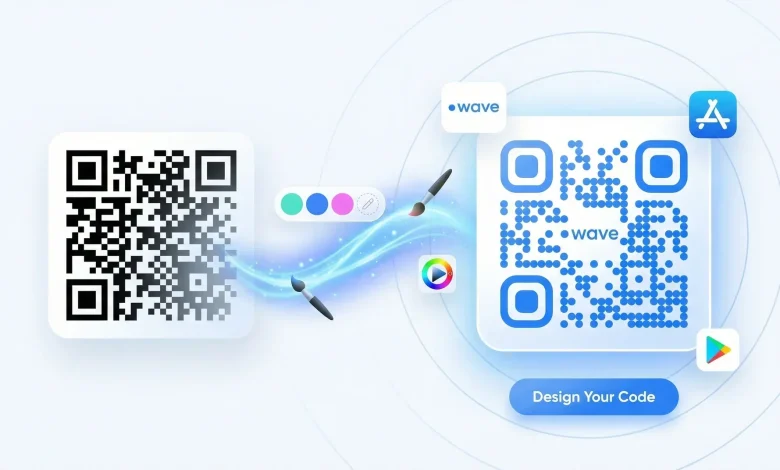
QR codes have evolved far beyond their warehouse-inventory origins. Today they are prime real estate for brand storytelling, and creative professionals are increasingly treating them as a visual asset rather than a functional afterthought. The problem is that most people still reach for the first free tool they find and generate a plain black-and-white square that clashes with their carefully crafted brand identity. The right platform and strategy can turn a QR code into a seamless extension of your visual brand. This article breaks down the platforms, features, and tips to help you do exactly that.
Why Customizable QR Codes Matter for Creative Professionals
A QR code is often the first physical touchpoint a customer has with your digital world. Whether it appears on a business card, a product label, a trade show banner, or a restaurant menu, that small square has a job to do beyond just linking somewhere. It needs to communicate trust, professionalism, and brand personality the moment someone notices it.
Generic QR codes fail on all three counts. A black-and-white grid surrounded by a company’s full-color logo and premium typography sends a mixed message, suggesting the brand paid close attention to everything except this one detail. That inconsistency chips away at credibility in ways that are hard to quantify but easy to feel.
Customizable QR code generators solve this by allowing you to match colors, embed logos, adjust shapes, and fine-tune every visible element to align with your brand standards. The result is a cohesive asset that works harder for you at every touchpoint.
Key Features to Look For in a QR Code Platform
Not all QR code generators are created equal. Before committing to any platform, it is worth understanding which features genuinely serve creative professionals and which are just marketing language.
Color Customization The ability to change both the foreground and background color of a QR code is the baseline requirement for branding. Look for platforms that let you input exact hex codes rather than choosing from a limited color picker. This precision is what allows a QR code to match your brand palette exactly rather than just approximating it.
Logo and Image Embedding Placing your logo in the center of a QR code is one of the most effective ways to reinforce brand recognition while keeping the code functional. A quality platform will let you upload a custom image and control its size so it does not interfere with scannability. Most professional tools maintain a safe zone for logo placement to ensure the error correction built into QR code technology can compensate for the obscured area.
Shape and Pattern Variation Beyond color, some platforms let you alter the shape of the individual modules as well as the eye shapes in the corners. Rounded modules give a softer, more modern feel, while custom eye shapes can add a visual signature that makes your QR code instantly recognizable.
File Format Options For professional print and digital use, you need more than a low-resolution PNG. Look for platforms that offer SVG, PDF, or EPS exports so your QR code scales perfectly at any size, from a business card to a billboard. Dynamic vs. Static Codes Dynamic QR codes allow you to change the destination URL after the code has already been printed, which is invaluable for campaigns, seasonal promotions, or any situation where the linked content might evolve. Static codes are fixed and free on most platforms, but dynamic codes typically require a subscription and unlock analytics features as well.
10 Tips for Using Customizable QR Code Generators to Strengthen Your Brand
1. Start With Brand Guidelines, Not the Tool
Before opening any generator, pull up your brand style guide. Note your exact hex codes, approved typefaces, logo usage rules, and any secondary color palette. Entering a QR code design session without this information leads to approximations that accumulate into inconsistency. Treat the QR code like any other brand asset and give it the same preparation you would give a social media graphic or a product label.
2. Use Adobe Express to Create QR Code Assets That Match Your Existing Designs
Adobe Express offers an integrated approach that many standalone QR tools cannot match. When you create QR code assets inside Adobe Express, you can work within the same design environment where you are already building social graphics, flyers, and marketing materials. This means your color library, uploaded brand fonts, and logo files are all immediately accessible, so there is no toggling between apps or manually re-entering hex values.
The practical advantage here goes beyond convenience. Designing a QR code inside the same platform you use for everything else means the final asset is already sized and formatted to drop directly into your existing templates, eliminating the mismatched-resolution problem that often occurs when a QR code is generated elsewhere and imported into a design file. Adobe Express is particularly well-suited to creative professionals who need branded QR codes quickly and at scale, whether for event materials, product packaging inserts, or digital campaign assets.
3. Test Scannability Before Finalizing Any Design
Every visual customization you apply, from color changes to logo embedding, introduces some degree of risk to scannability. A code that looks polished on screen but fails to scan in the real world is worse than no code at all because it creates a frustrating dead end for your audience. Always test the finished code across multiple devices and scanning apps before sending anything to print or publishing it digitally. Test in good lighting and low lighting, and test from the distance and angle at which it will realistically be scanned.
A good rule of thumb is to maintain at least a 4:1 contrast ratio between the module color and the background. Light modules on a dark background can work, but many scanners are optimized for dark-on-light, so if you choose an inverted palette, test even more rigorously than usual.
4. Add a Clear Call to Action Near the Code
A QR code by itself does not tell anyone what will happen when they scan it. Adding a short line of text nearby, such as “Scan for exclusive access” or “Scan to shop the collection,” dramatically increases scan rates by removing the uncertainty that makes people hesitate. This supporting text is also a branding opportunity. Use your brand voice, your brand font, and keep it short. The call to action should require no more than a two-second read.
5. Leverage Dynamic Codes for Any Printed Campaign Material
If you are printing QR codes on anything with a production run, use a dynamic code. The ability to redirect the URL after the fact is not just a convenience feature; it is a risk management tool. Printing errors happen, campaigns change direction, and destinations move. A dynamic code gives you the ability to course-correct without reprinting an entire run of materials. Most platforms that offer dynamic codes also include scan analytics, which means you can measure exactly how many people are engaging with each piece of printed collateral.
6. Match the QR Code Shape Language to Your Brand Personality
If your brand leans on organic shapes, soft gradients, and rounded typography, a QR code built with sharp square modules and angular corner eyes will feel out of place. Conversely, a technical or industrial brand might find that the standard geometric grid reinforces its character. Use the module and eye shape options available in your chosen platform intentionally, not just because they look interesting in isolation. Ask whether the shape choices feel like they belong to the same visual family as your logo and overall design system.
7. Use a URL Shortener Before Generating the Code
Longer URLs generate denser QR codes with more modules packed into a smaller space. Denser codes are harder to scan, especially when printed small. Before generating any QR code, run your destination URL through a link-shortening service to reduce the data load. This is also where you can set up UTM parameters to track traffic from the QR code in your analytics platform, which is essential for measuring the ROI of any physical marketing material.
8. Maintain Adequate Quiet Zone Around the Code
The quiet zone is the blank margin surrounding the QR code itself. Scanners need this space to identify where the code begins and ends. A common branding mistake is cropping the quiet zone too tightly to save space or fit a design layout, which degrades scan performance. As a general standard, maintain a quiet zone at least four modules wide on all sides. If you are placing the code on a dark or patterned background, consider adding a white or light-colored frame to create that margin when the underlying surface cannot provide it.
9. Design for the Medium Where the Code Will Live
A QR code destined for a 3-inch business card needs to be designed differently than one appearing on a 6-foot trade show backdrop. For small applications, keep the design simple: fewer colors, no logo embedding, and maximum contrast. For large-format applications, you have more room to build in visual complexity while maintaining scannability. Always design with the final medium in mind rather than designing once and scaling arbitrarily.
10. Audit Your QR Codes Regularly
If you are using dynamic codes, schedule a regular audit of every active QR code in your ecosystem. Check that all destination URLs are still live and directing to the correct pages. Broken QR codes in printed materials you no longer control, such as old business cards still in circulation or magazine ads from a previous quarter, are an ongoing source of brand damage. A simple quarterly review of your dynamic code dashboard can catch dead links before they create friction for your audience.
Choosing the Right Platform for Your Workflow
The ideal QR code generator for a creative professional is one that fits into your existing production process without adding friction. If you are already working in a design suite for your other visual assets, a tool that integrates with that environment is almost always preferable to a standalone generator that requires you to export, import, and reformat.
Look for platforms that offer template libraries you can save and reuse so that once you have built a QR code design that matches your brand, you do not have to recreate it from scratch every time. Batch generation capabilities are worth considering if you manage multiple brands or need to create large volumes of unique codes for individual products, events, or locations. Analytics dashboards are increasingly standard in professional-tier tools and should be a priority if you are using QR codes for any measurable marketing activity, since knowing which codes are being scanned, where, and at what rate is the data that justifies the design investment and helps you iterate on future campaigns.
FAQs
What makes a QR code “on-brand,” and how do I achieve that?
An on-brand QR code uses your exact brand colors, incorporates your logo or another brand mark, and reflects the overall design language of your visual identity. To achieve this, you need a generator that supports precise hex color input, allows logo uploads with adjustable sizing, and offers enough module and eye shape variation to align with your aesthetic. The process is the same as designing any brand asset: start with your style guide, apply your standards, and test the result before it goes live. The biggest mistake people make is treating the QR code as a technical utility rather than a design element, which leads to inconsistency that undermines the overall brand presentation.
Are customized QR codes harder to scan than standard ones?
Customized QR codes are not inherently harder to scan, but poorly executed customization can reduce scannability. The two most common issues are insufficient contrast between the module color and the background, and logo embeds that cover too much of the code’s data area. Most professional platforms apply error correction algorithms that allow a significant portion of the code to be obscured without affecting functionality. As long as you stay within the platform’s recommended parameters for logo size and maintain adequate color contrast, a well-designed custom QR code will scan just as reliably as a standard one.
What is the difference between a dynamic and a static QR code, and which should creative professionals use?
A static QR code encodes the destination URL directly into its pattern, which means the code must be regenerated if the destination ever changes. A dynamic QR code points to a redirect URL managed by the platform, allowing you to update the destination at any time without changing the printed code itself. For creative professionals working on campaigns, client projects, or material that might evolve over time, dynamic codes are almost always the better choice. They also include scan analytics, which provide actionable data on engagement. For one-time personal use where the destination will never change, static codes are perfectly adequate. If you want to connect your QR code analytics to a broader marketing reporting stack, consider using Google Looker Studio to visualize your scan data alongside other campaign metrics in a single unified dashboard.
How small can a QR code be printed without losing scannability?
The general minimum recommended size for a printed QR code is 2 x 2 centimeters, but this assumes a simple, low-density code with strong contrast. Highly customized codes with complex color treatments or embedded logos should be printed larger to compensate for the visual complexity. As a practical guideline, if the code will appear on a business card alongside other content, aim for at least 2.5 x 2.5 centimeters and avoid any logo embedding at that scale. For anything smaller than 2 centimeters, scannability becomes highly dependent on the quality of the printing surface, lighting conditions, and the camera quality of the scanning device, and the risk of failure increases substantially.
Can I use custom QR codes across both print and digital without redesigning them?
Yes, with the right file format. If you export your QR code as an SVG or PDF vector file, it can scale to any size without quality loss, making it suitable for both a digital ad unit and a large-format print piece from the same source file. Raster formats like PNG and JPEG have a fixed resolution and may appear pixelated when scaled up for print. Always request vector exports from your QR code platform when the asset will be used across multiple channels and sizes. If vector export is not available, export at the highest resolution the platform offers and test the print output before committing to a full production run.
Conclusion
Customizable QR codes are no longer a novelty reserved for big-budget campaigns. They are an accessible, practical branding tool that creative professionals at every level can use to create more cohesive, polished, and measurable touchpoints. The key is approaching them with the same intentionality you bring to every other visual asset: use your brand standards, choose a platform that integrates with your existing workflow, and always test before you publish or print.
The platforms and features available today make it easier than ever to produce QR codes that look like they belong to your brand rather than bolted on as an afterthought. Whether you are designing for a single client project or managing assets across multiple campaigns, the tips in this article give you a repeatable process for getting it right every time. A well-designed QR code is a small detail that signals a large commitment to quality, and your audience will notice.